Client dashboard
See what is live. Understand why.
A current price is only half the answer. The CoinPriceFeeds dashboard shows its age, status, inputs, schedule, and loaded rule version in one client-specific view.
- See every output and available source quote.
- Follow dependencies and explicit status reasons.
- Separate read-only access from pricing actions.
Current state
View bid, ask, exact timestamp, age, and status for each symbol.
Pricing context
See source relationships, the active rule page, and the weekly schedule.
Controlled actions
Authorized writers can apply a validated rules update or reset protected state.
On this page
Current values and clear status
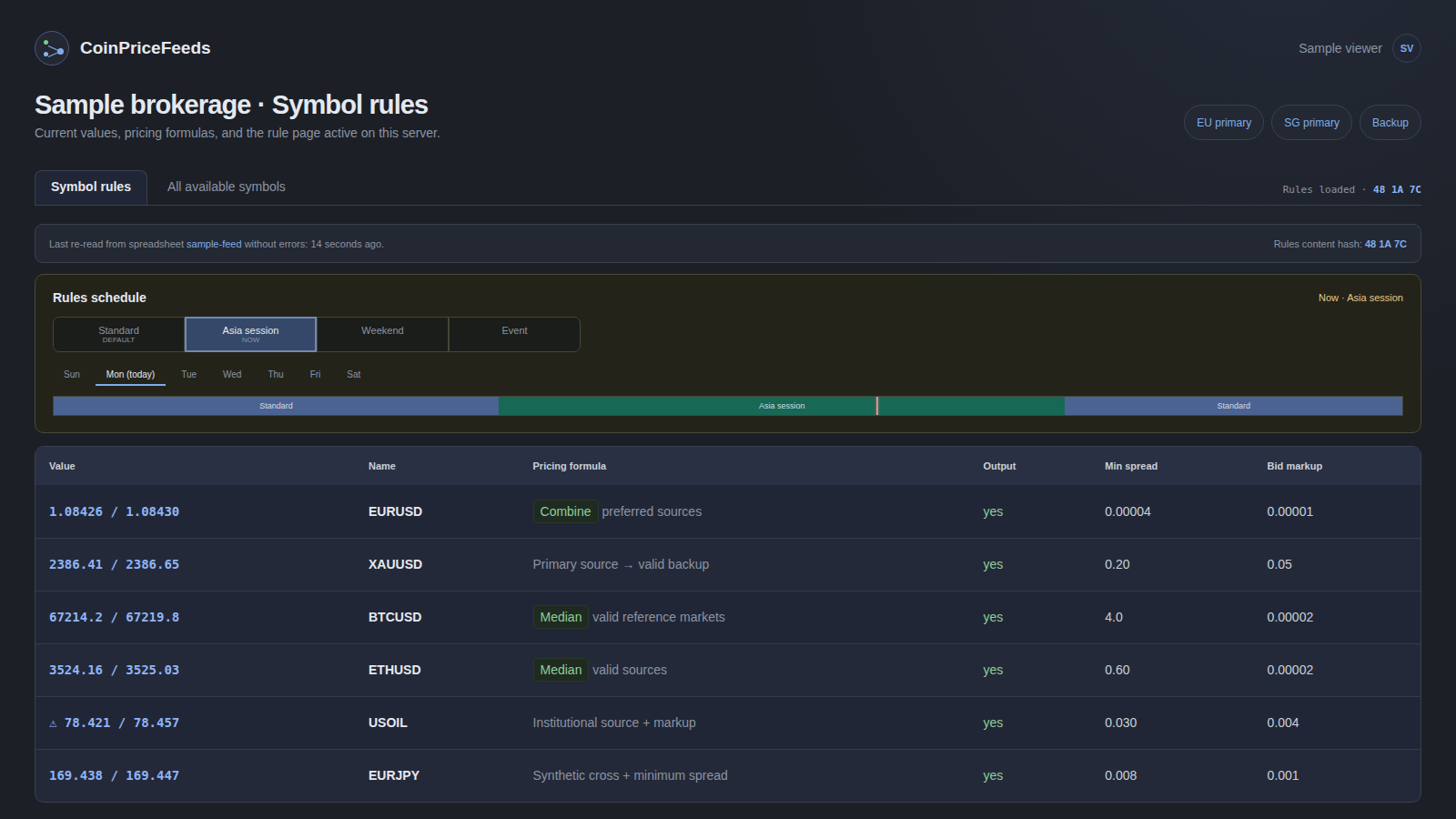
The main dashboard view shows the symbols defined by the active pricing rules. Each row includes the current value, its age, and the controls associated with that output.
Status markers make common problems distinct:
- Protected means an abnormal move was held back and the accepted value was retained.
- Invalid includes a reason, such as a cancelled source or a calculation that has no valid result.
- Stale means the quote has aged beyond the pricing policy.
The state is explained in text as well as color, which keeps it usable during a real incident and for people who do not perceive color differences.
Follow the inputs behind an output
Pricing formulas and source references are rendered as a readable structure. Symbol references can be followed to the current input value, age, and status.
An additional view lists every symbol currently known to the feed—including source quotes—and shows which downstream outputs depend on it.
That turns questions such as “Which client symbols are affected if this venue stops quoting?” into a direct lookup instead of a spreadsheet search or support ticket.
See the active schedule
When a feed uses time- or weekday-specific rule pages, the dashboard renders the week as a timeline.
The view shows:
- the default policy;
- each scheduled rule page;
- the page active now;
- a live position in the current day; and
- overlapping windows in their effective order.
This helps a dealer verify that a weekend, session, or event policy is active when intended.
Confirm a change reached the server
Every feed view shows the last successful rules load and a fingerprint of the loaded content.
After an authorized writer asks CoinPriceFeeds to re-read the rules sheet, the result states whether the content actually changed and which page is active. The same fingerprint is available on the price stream and monitoring surface, so primary and backup servers can be checked against one another.
Learn more about configuration agreement and redundant delivery .
Reader and writer roles
Dashboard access follows the client’s own rules-sheet sharing list.
Readers can inspect prices, formulas, schedules, and status. Writers can also activate a validated sheet update or clear protected quote state. This keeps viewing available to a wider operational group while limiting actions that may change live pricing.
Sign-in uses a time-limited email link rather than a shared dashboard password. Changing the sheet permission removes access after dashboard permissions are next refreshed.
Controlled recovery actions
A latched protection sometimes needs a human decision. For example, a large market move may be genuine even though it correctly triggered the configured gap control.
Authorized writers can clear one stored quote or reset the feed’s protected quote state. These actions are protected against unauthorized browser requests and written to the operational log.
Live pricing-state changes remain deliberate and attributable to an authorized user.
Use the state in your own monitoring
An authenticated JSON snapshot provides the complete current quote state for a feed, including values, timestamps, invalid reasons, and protection flags.
Clients can use it for internal monitoring, reconciliation, or incident tooling without scraping HTML.
For wider operational coverage, monitoring and verification adds quote activity, delivery delay, connected-client state, alerts, and cross-server comparison.
Fast and useful during an incident
The dashboard is server-rendered, mobile-friendly, and designed without third-party runtime assets. It remains useful on a phone, over a restricted corporate network, or when an external asset host is unavailable.
Compact tables, keyboard-visible focus, and horizontally scrollable quote views keep the interface usable on small screens.
A feed shaped around your setup
See a representative symbol in a demo feed.
Request a demo feed to inspect how source inputs move through pricing rules, status, and delivery in the dashboard.